The LEA Professional Cloud: How to Set Up Your Cloud Account
Introducing The LEA PROFESSIONAL CLOUD – cloud monitoring, control, and analytics for professional amplifiers. This Cloud platform gives system integrators powerful, reliable, and secure remote monitoring and control capabilities when used with the CONNECTSERIES of IoT-Enabled professional amplifiers.
By leveraging a built-in Amazon Web Services (AWS) IoT Core, system integrators can send their CONNECTSERIES systems into the Cloud where they can be accessed and controlled from anywhere in the world without the need to VPN into a Local Area Network.
The capability delivers greater visibility to provide preventative maintenance, easier troubleshooting and fewer on-site maintenance requirements, ultimately providing a recurring revenue stream for integrators to add to their service contracts. Register for your free LEA Cloud account at leaprofessional.cloud
MAIN FEATURES
No Cost or Monthly Fee to use
Add Venues to your LEA Cloud Account and easily manage your multiple installations
Uses Amazon Web Services (AWS) IoT Core
Encrypted 256bit SSL Security from the amp to cloud and from your device to the cloud
Amplifiers can connect to over 50 Global AWS-managed servers
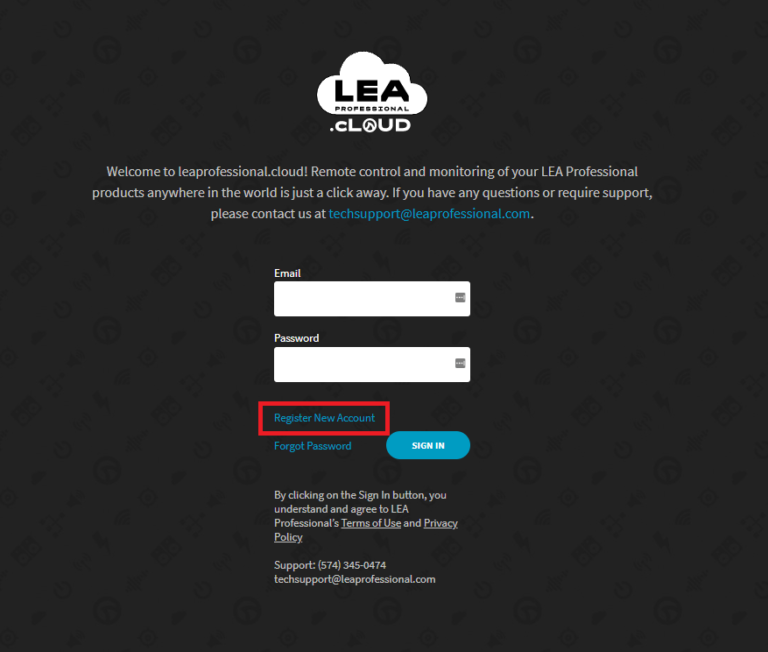
Register a new account by clicking on Register New Account link.
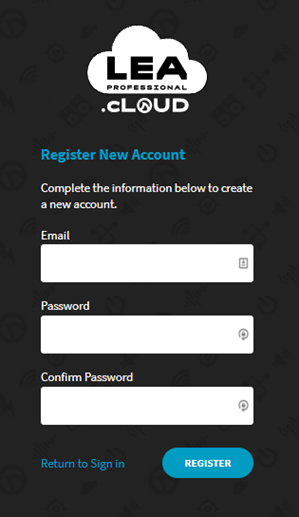
Fill out the fields with a valid email and password for the new account.
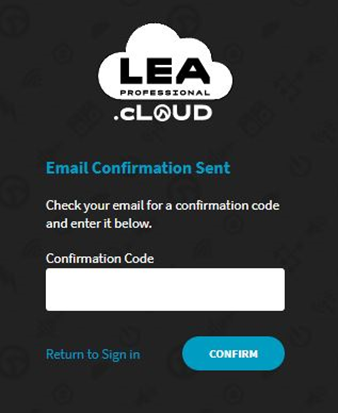
You will receive an email with confirmation number to confirm the email address is valid. Enter the confirmation number in the registration page. If you don’t receive the confirmation, please make sure to check your junk folder.
The account has been created. Click on the SIGN IN button and login with the email address and password that was just used to create the account.
Hi there,
I have a problem adding an amp to my cloud. When I copy the Token from my Venue there is the prompt “Something went wrong!”. Any ideas?
Cheers,
Volker
Sorry to hear you’re running into an error. There are a few things that could be happening. If you give us a call, we can talk through some ideas.
Here’s the tech support number: +1 (574) 345-0474
Comments are closed.
This website uses cookies to improve your experience. We'll assume you're ok with this, but you can opt-out if you wish.AcceptRejectRead More
Privacy & Cookies Policy
Privacy Overview
This website uses cookies to improve your experience while you navigate through the website. Out of these, the cookies that are categorized as necessary are stored on your browser as they are essential for the working of basic functionalities of the website. We also use third-party cookies that help us analyze and understand how you use this website. These cookies will be stored in your browser only with your consent. You also have the option to opt-out of these cookies. But opting out of some of these cookies may affect your browsing experience.
Necessary cookies are absolutely essential for the website to function properly. This category only includes cookies that ensures basic functionalities and security features of the website. These cookies do not store any personal information.
Any cookies that may not be particularly necessary for the website to function and is used specifically to collect user personal data via analytics, ads, other embedded contents are termed as non-necessary cookies. It is mandatory to procure user consent prior to running these cookies on your website.





Hi there,
I have a problem adding an amp to my cloud. When I copy the Token from my Venue there is the prompt “Something went wrong!”. Any ideas?
Cheers,
Volker
Hey Volker,
Sorry to hear you’re running into an error. There are a few things that could be happening. If you give us a call, we can talk through some ideas.
Here’s the tech support number: +1 (574) 345-0474